
LATEST NEWS
📢 IMPORTANT UPDATE: SpaceX filhal working nahi hai. | ✅ WORKING PRODUCTS: Gadar, TeslaX, Superman, Endgame, aur Pubg full speed mein chal rahe hain! | ⚡ VISIT DASHBOARD: Sabhi updates ke liye Dashboard check karein. | 🆕 NEW LAUNCH: WINDOW TS Exclusive is live.
NEW LAUNCH • EXCLUSIVE

WINDOW TS A New Era of Tatkal Booking

Ye sirf ek software nahi hai. Ye ek special Tatkal booking product experience hai jo workflow ko simple banata hai: No Token aur No daily pre-booking checklist.
No Token Workflow No Pre‑Booking Steps Free Installation
Exclusive Workflow
Fast Setup. Clean Flow.
Dashboard se download, guided installation, aur support.
Quick Start – account activate hote hi ready flow.
Support – voice + chat support for setup help.
Training – guided steps to reduce confusion.
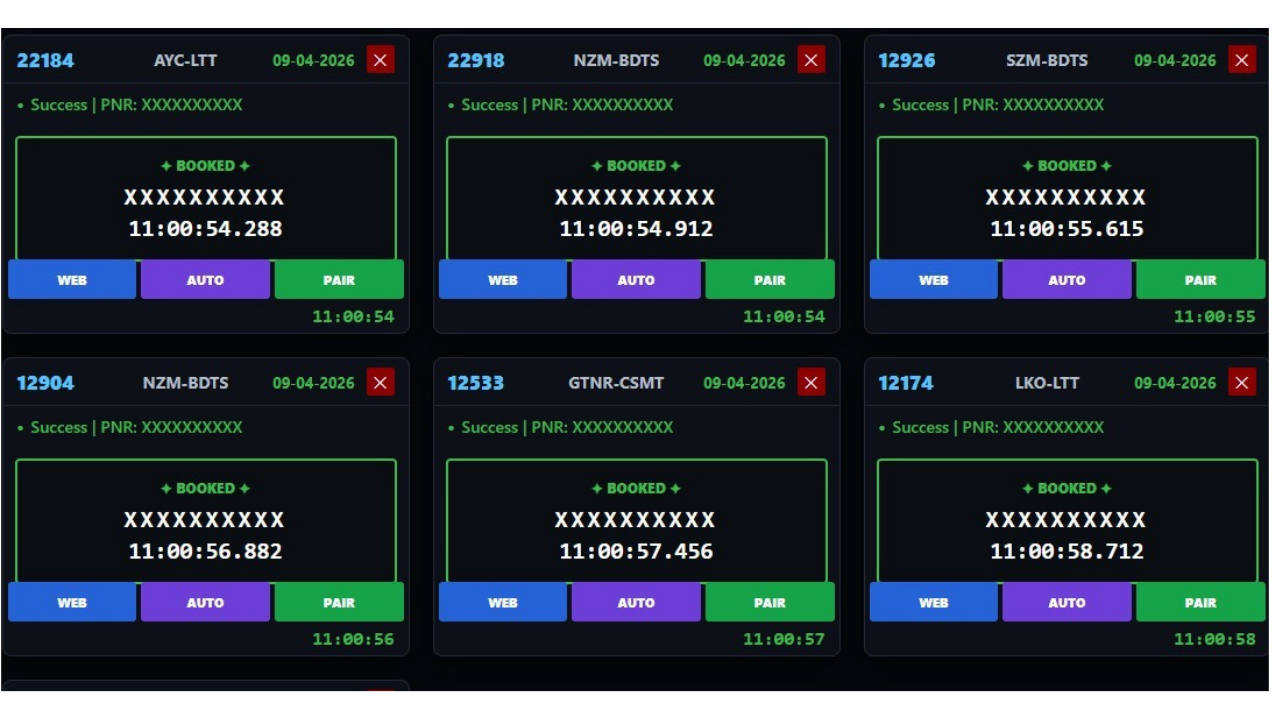
Product Success Interface
Preview
WINDOW TS Success Interface
Highlights

WINDOW TS Features

Exclusive product experience designed to keep your booking workflow simple and support-driven.

No Token
Token management aur daily token routine ki zaroorat nahi.
No Pre‑Booking Steps
Extra pre-checklist ki dependency kam karke workflow ko direct banata hai.
Simple Setup
Dashboard-based download + guided installation steps.
Quick Support
Unlimited voice support + chat support for smooth onboarding.
Free Installation
Team aapke system me install karke ready karegi.
Free Training
Step-by-step training to reduce mistakes during booking.
Pricing

WINDOW TS Price

Exclusive plan with installation, support, and training included.

EXCLUSIVE PLAN
WINDOW TS • 1 Month
₹3500
/ month
Free installation
Quick support
Unlimited voice support
Chat support
24×7 support
30 days validity
Free training
Guided setup
Download
Get Access
Download aur activation Dashboard se milega.
Tutorial

Installation Guide (Step‑by‑Step)

Ye section aapko installation aur basic workflow ko quickly samajhne me help karega.

YouTube Installation Video
Follow the exact steps shown in the tutorial
Step-by-Step
Quick Installation Steps
  1. 1Dashboard me login karke WINDOW TS download karein.
  2. 2Setup file ko run karein aur basic permissions allow karein.
  3. 3Team se connect karke free installation complete karwayein.
  4. 4Training ke baad apna workflow ready karke booking start karein.
SEO Article
WINDOW TS Kya Hai?
WINDOW TS TatkalHub ka ek exclusive product experience hai jo Tatkal booking workflow ko simplify karta hai. Iska focus user ko easy setup, guided installation, aur strong support provide karna hai, taaki booking time par confusion aur delays kam ho.
Agar aap Tatkal booking agent ho ya regular booking karte ho, to WINDOW TS aapko clear steps, training, aur support ke saath on-board karta hai. Activation aur downloads Dashboard se milte hain, jisse latest updates aur support access simple rehta hai.
Keyword focus: WINDOW TS, Tatkal booking, no token workflow, TatkalHub dashboard download, Tatkal installation guide, Tatkal booking support.
Community

Follow & Join

Updates, support, aur announcements ke liye channels join karein.

FAQ

Frequently Asked Questions

Common questions about WINDOW TS.

Is product mein token send karna padta hai?
No token required. Workflow ko simple rakhne ke liye token routine ki zaroorat nahi hoti.
Booking se pehle IP block check karna zaroori hai?
No extra manual checks ki zaroorat nahi. Aap apni details save karke guided steps follow kijiye aur booking process continue kijiye.
Is product mein IP lagana zaroori hai?
No manual IP/proxy setup required. Normal internet connection ke saath guided workflow follow kar sakte hain.
Validity kitne din ki hoti hai?
Validity 1 month hoti hai.
Product lene ke baad training milegi?
Yes, training provide ki jaati hai.
Kya aap install karke denge?
Yes, free installation included hai. Team install karke ready karegi.